Bạn đang xem tài liệu về Apigee Edge.
Truy cập vào
tài liệu Apigee X. thông tin
Các phần sau đây mô tả các vấn đề đã biết với Apigee Edge và Edge cho Đám mây riêng. Trong hầu hết các trường hợp, những vấn đề được liệt kê sẽ được khắc phục trong một bản phát hành sau này.
Các vấn đề đã biết khác về Edge
Các phần sau đây mô tả các vấn đề đã biết khác nhau với Edge.
| Khu vực/Tóm tắt | Vấn đề đã biết |
|---|---|
Kết quả hết hạn bộ nhớ đệm dẫn đến giá trị cachehit không chính xác |
Khi biến flow Giải pháp: Lặp lại quy trình (thực hiện lệnh gọi thứ hai) ngay sau lệnh gọi đầu tiên. |
Việc đặt Chính sách InvalidateCache
PurgeChildEntries thành true không hoạt động đúng cách |
Việc đặt Giải pháp: Sử dụng chính sách KeyValueMapOperations để lặp lại việc tạo phiên bản bộ nhớ đệm và bỏ qua việc cần phải vô hiệu hoá bộ nhớ đệm. |
| Các yêu cầu triển khai đồng thời cho một SharedFlow hoặc proxy API có thể dẫn đến trạng thái không nhất quán trong Máy chủ quản lý, trong đó nhiều bản sửa đổi được hiển thị là đã triển khai. |
Điều này có thể xảy ra, ví dụ: khi các lần chạy đồng thời của quy trình triển khai CI/CD xảy ra bằng các bản sửa đổi khác nhau. Để tránh vấn đề này, hãy tránh triển khai proxy API hoặc SharedFlow trước khi quá trình triển khai hiện tại hoàn tất. Giải pháp: Tránh triển khai proxy API hoặc SharedFlow đồng thời. |
| Số lệnh gọi API hiển thị trong Phân tích API Edge có thể chứa dữ liệu trùng lặp. |
Đôi khi, Edge API Analytics có thể chứa dữ liệu trùng lặp cho các lệnh gọi API. Trong trường hợp đó, số lượng hiển thị cho các lệnh gọi API trong Edge API Analytics sẽ cao hơn các giá trị tương đương hiển thị trong các công cụ phân tích của bên thứ ba. Giải pháp: Xuất dữ liệu phân tích và sử dụng trường gateway_flow_id để loại bỏ dữ liệu trùng lặp. |
Các vấn đề đã biết với giao diện người dùng Edge
Các phần sau đây mô tả các vấn đề đã biết với giao diện người dùng Edge.
| Khu vực/Tóm tắt | Vấn đề đã biết |
|---|---|
| Không thể truy cập vào trang Quản trị vùng SSO của Edge từ thanh điều hướng sau khi tổ chức được liên kết với một vùng nhận dạng |
Khi kết nối một tổ chức với một vùng nhận dạng, bạn sẽ không thể truy cập vào trang Quản trị vùng SSO của Edge từ thanh điều hướng bên trái bằng cách chọn Quản trị > SSO. Giải pháp: Truy cập trực tiếp vào trang bằng URL sau: https://apigee.com/sso |
| Cấu hình TLS của giao diện người dùng Edge |
Các lựa chọn Giải pháp tạm thời: Làm theo các bước dưới đây để bật các mật mã cụ thể cho Giao diện người dùng Edge:
|
Các vấn đề đã biết về trang tổng quan tích hợp
Các phần sau đây mô tả các vấn đề đã biết với cổng thông tin tích hợp.
| Khu vực | Vấn đề đã biết |
|---|---|
| SmartDocs |
|
| Nhà cung cấp dịch vụ danh tính SAML | Chúng tôi không hỗ trợ tính năng đăng xuất một lần (SLO) bằng nhà cung cấp dịch vụ danh tính SAML cho miền tuỳ chỉnh. Để bật miền tuỳ chỉnh bằng nhà cung cấp danh tính SAML, hãy để trống trường URL đăng xuất khi bạn định cấu hình chế độ cài đặt SAML. |
| Quản trị viên cổng thông tin |
|
| Các tính năng của Cổng thông tin |
|
Các vấn đề đã biết với Edge cho Đám mây riêng tư
Các phần sau đây mô tả các vấn đề đã biết với Edge cho Đám mây riêng tư.
| Khu vực | Vấn đề đã biết |
|---|---|
| Edge for Private Cloud 4.53.01 |
Đánh giá lỗ hổng bảo mật NGINX (CVE-2026-42945)
Một lỗ hổng bảo mật (CVE-2026-42945) đã được tiết lộ, ảnh hưởng đến Tác động đến Apigee Edge cho Đám mây riêng tư: Apigee Edge cho Đám mây riêng không bị ảnh hưởng bởi lỗ hổng này trong cấu hình mặc định được cung cấp. Khả năng khai thác CVE-2026-42945 phụ thuộc vào các mẫu cấu hình NGINX cụ thể, đặc biệt là việc sử dụng chỉ thị Việc cần làm:
|
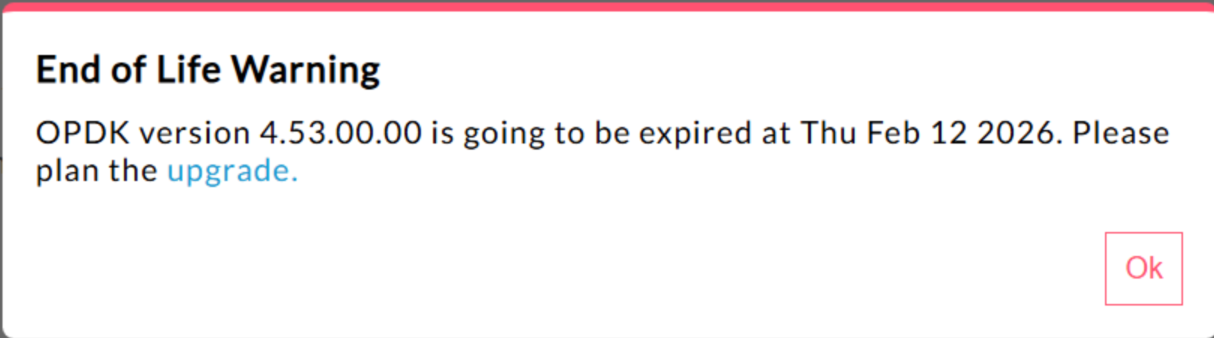
| Edge for Private Cloud 4.53.00 | 440148595: End of Life Popup Warning Displayed Excessively
Trong Edge cho Đám mây riêng tư phiên bản 4.53.00 trở lên, giao diện người dùng sẽ hiển thị một cửa sổ bật lên cảnh báo"Ngừng hoạt động" (EOL). Cảnh báo này xuất hiện nhiều lần và không thể ngăn chặn hoặc giảm tần suất xuất hiện. Hiện tại, người dùng không có cách nào để tắt hoặc giảm tần suất cảnh báo về ngày kết thúc hỗ trợ này. |
| Edge for Private Cloud 4.53.01 |
Chú thích Java
Các lệnh gọi Java tuỳ chỉnh cố gắng tải trình cung cấp mật mã Bouncy Castle bằng tên "BC" có thể không thành công vì trình cung cấp mặc định đã được thay đổi thành Bouncy Castle FIPS để hỗ trợ FIPS. Tên nhà cung cấp mới cần sử dụng là "BCFIPS". |
| Edge for Private Cloud 4.53.00 |
Chú thích Java
Các lệnh gọi Java tuỳ chỉnh cố gắng tải trình cung cấp mật mã Bouncy Castle bằng tên "BC" có thể không thành công vì trình cung cấp mặc định đã được thay đổi thành Bouncy Castle FIPS để hỗ trợ FIPS. Tên nhà cung cấp mới cần sử dụng là "BCFIPS". |
| Bản cập nhật Mint cho Edge for Private Cloud 4.52.01 |
Vấn đề này chỉ ảnh hưởng đến những người đang sử dụng MINT hoặc đã bật MINT trong Edge cho các bản cài đặt Đám mây riêng. Thành phần bị ảnh hưởng: edge-message-processor Vấn đề: Nếu đã bật tính năng kiếm tiền và đang cài đặt phiên bản 4.52.01 dưới dạng một bản cài đặt mới hoặc nâng cấp từ các phiên bản trước của Đám mây riêng, bạn sẽ gặp phải vấn đề với bộ xử lý thông báo. Số lượng luồng mở sẽ tăng dần, dẫn đến tình trạng cạn kiệt tài nguyên. Ngoại lệ sau đây xuất hiện trong system.log của edge-message-processor: Error injecting constructor, java.lang.OutOfMemoryError: unable to create new native thread |
| Lỗ hổng HTTP/2 của Apigee | Gần đây, người ta đã phát hiện một lỗ hổng Từ chối dịch vụ (DoS) trong nhiều cách triển khai giao thức HTTP/2 (CVE-2023-44487), kể cả trong Apigee Edge cho Đám mây riêng tư. Lỗ hổng này có thể dẫn đến tình trạng DoS đối với chức năng quản lý API của Apigee. Để biết thêm thông tin, hãy xem Bản tin bảo mật GCP-2023-032 của Apigee. Các thành phần bộ định tuyến và máy chủ quản lý của Edge for Private Cloud được kết nối với Internet và có thể dễ bị tấn công. Mặc dù HTTP/2 được bật trên cổng quản lý của các thành phần dành riêng cho Edge khác của Edge cho Đám mây riêng, nhưng không có thành phần nào trong số đó được hiển thị trên Internet. Trên các thành phần không phải Edge, chẳng hạn như Cassandra, Zookeeper và các thành phần khác, HTTP/2 không được bật. Bạn nên thực hiện các bước sau để giải quyết lỗ hổng Edge cho Đám mây riêng tư:
Hãy làm theo các bước sau nếu bạn đang sử dụng Edge Private Cloud phiên bản 4.51.00.11 trở lên:
Hãy làm theo các bước sau nếu bạn đang sử dụng Edge cho các phiên bản Đám mây riêng tư cũ hơn 4.51.00.11:
|
| Nâng cấp Postgresql khi cập nhật lên phiên bản 4.52 | Apigee-postgresql đang gặp vấn đề khi nâng cấp từ Edge for Private Cloud phiên bản 4.50 hoặc 4.51 lên phiên bản 4.52. Vấn đề này chủ yếu xảy ra khi số lượng bảng lớn hơn 500. Bạn có thể kiểm tra tổng số bảng trong Postgres bằng cách chạy truy vấn SQL bên dưới: select count(*) from information_schema.tables Giải pháp tạm thời: Khi Cập nhật Apigee Edge 4.50.00 hoặc 4.51.00 lên 4.52.00, hãy nhớ thực hiện bước sơ bộ trước khi nâng cấp Apigee-postgresql. |
| Chính sách LDAP | 149245401: Các chế độ cài đặt nhóm kết nối LDAP cho JNDI được định cấu hình thông qua tài nguyên LDAP không được phản ánh và các giá trị mặc định của JNDI gây ra các kết nối một lần mỗi lần. Do đó, các kết nối đang được mở và đóng mỗi lần để sử dụng một lần, tạo ra một số lượng lớn các kết nối mỗi giờ đến máy chủ LDAP. Giải pháp: Để thay đổi các thuộc tính của nhóm kết nối LDAP, hãy thực hiện các bước sau để thiết lập thay đổi chung cho tất cả các chính sách LDAP.
Để xác minh rằng các thuộc tính JNDI của nhóm kết nối đang có hiệu lực, bạn có thể thực hiện tcpdump để quan sát hành vi của nhóm kết nối LDAP theo thời gian. |
| Độ trễ xử lý yêu cầu cao | 139051927: Độ trễ xử lý proxy cao được tìm thấy trong Trình xử lý thông báo đang ảnh hưởng đến tất cả các Proxy API. Các triệu chứng bao gồm độ trễ 200 – 300 mili giây trong thời gian xử lý so với thời gian phản hồi API bình thường và có thể xảy ra ngẫu nhiên ngay cả khi TPS thấp. Điều này có thể xảy ra khi có hơn 50 máy chủ đích mà một trình xử lý thông báo kết nối. Nguyên nhân gốc: Các trình xử lý thông báo duy trì một bộ nhớ đệm ánh xạ URL máy chủ đích đến đối tượng HTTPClient cho các kết nối đi đến máy chủ đích. Theo mặc định, chế độ cài đặt này được đặt thành 50, có thể quá thấp đối với hầu hết các lượt triển khai. Khi một lượt triển khai có nhiều tổ hợp tổ chức/môi trường trong một chế độ thiết lập và có số lượng lớn máy chủ đích vượt quá 50, thì các URL máy chủ đích sẽ liên tục bị loại bỏ khỏi bộ nhớ đệm, gây ra độ trễ. Xác thực: Để xác định xem việc loại bỏ URL máy chủ đích có gây ra vấn đề về độ trễ hay không, hãy tìm kiếm từ khoá "onEvict" hoặc "Eviction" trong Message Processor system.logs. Sự xuất hiện của các URL này trong nhật ký cho biết rằng các URL máy chủ đích đang bị loại bỏ khỏi bộ nhớ đệm HTTPClient vì kích thước bộ nhớ đệm quá nhỏ. Giải pháp tạm thời:
Đối với Edge for Private Cloud phiên bản 19.01 và 19.06, bạn có thể chỉnh sửa và định cấu hình bộ nhớ đệm HTTPClient, conf/http.properties+HTTPClient.dynamic.cache.elements.size=500 Sau đó, hãy khởi động lại trình xử lý tin nhắn. Thực hiện các thay đổi tương tự cho tất cả các trình xử lý thông báo. Giá trị 500 là một ví dụ. Giá trị tối ưu cho chế độ thiết lập của bạn phải lớn hơn số lượng máy chủ đích mà bộ xử lý thông báo sẽ kết nối. Không có tác dụng phụ nào khi đặt thuộc tính này cao hơn và ảnh hưởng duy nhất sẽ là thời gian xử lý yêu cầu của trình xử lý thông báo được cải thiện.
Lưu ý: Edge cho Đám mây riêng tư phiên bản 50.00 có chế độ cài đặt mặc định là 500. |
| Nhiều mục cho các mối liên kết khoá-giá trị | 157933959: Việc chèn và cập nhật đồng thời vào cùng một bản đồ giá trị khoá (KVM) có phạm vi ở cấp tổ chức hoặc môi trường sẽ gây ra dữ liệu không nhất quán và mất nội dung cập nhật. Lưu ý: Giới hạn này chỉ áp dụng cho Edge for Private Cloud. Edge cho Đám mây công khai và Đám mây kết hợp không có giới hạn này. Để khắc phục vấn đề trong Edge cho Đám mây riêng tư, hãy tạo KVM ở phạm vi |