Apigee に関する既知の問題

Apigee Edge のドキュメントを表示しています。
Apigee X のドキュメントに移動
情報

以降のセクションでは、Apigee の既知の問題について説明します。これらの問題は今後のリリースで修正される予定です。

Edge のその他の既知の問題

以降のセクションでは、Edge のその他の既知の問題について説明します。

エリア/概要 既知の問題
キャッシュの有効期限が切れると cachehit 値が正しくない

cachehit フロー変数が LookupCache ポリシーの後に使用されている場合、非同期動作のデバッグポイントがディスパッチされる方法が原因で、LookupPolicy はコールバックが実行される前に DebugInfo オブジェクトにデータを入力し、エラーが発生します。

回避策: 1 回目の呼び出しの直後に、このプロセスを繰り返して(2 回目の呼び出しを実行します)。

InvalidateCache ポリシーの PurgeChildEntries を true に設定しても正しく機能しない

InvalidateCache ポリシーで PurgeChildEntries を設定すると、KeyFragment 要素の値のみがパージされますが、キャッシュ全体が消去されます。

回避策: KeyValueMapOperations ポリシーを使用してキャッシュのバージョニングを反復処理し、キャッシュの無効化を回避します。

SharedFlow または API プロキシの同時デプロイ リクエストを行うと、Management Server で一貫性のない状態になり、複数のリビジョンがデプロイ済みとして表示されることがあります。

これは、異なるリビジョンを使用して CI/CD デプロイ パイプラインの同時実行が行われた場合などに発生することがあります。この問題を回避するには、現在のデプロイが完了する前に API プロキシまたは SharedFlow をデプロイしないようにします。

回避策: API プロキシまたは SharedFlow の同時デプロイを回避します。

Edge API Analytics に表示される API 呼び出し数に重複データが含まれている場合があります。

Edge API Analytics には、API 呼び出しの重複データが含まれることがあります。その場合、Edge API Analytics の API 呼び出しのカウントは、サードパーティの分析ツールに表示される同等の値よりも高くなります。

回避策: アナリティクス データをエクスポートし、gateway_flow_id フィールドを使用してデータを重複除去します。

Edge UI の既知の問題

以下のセクションでは、Edge UI の既知の問題について説明します。

領域 既知の問題
組織が ID ゾーンにマッピングされると、ナビゲーション バーから [Edge SSO Zone Administration] ページにアクセスできなくなります。 組織を ID ゾーンに接続すると、左側のナビゲーション バーから [管理者] > [SSO] を選択しても、[Edge SSO Zone Administration] ページにアクセスできなくなります。回避策として、https://apigee.com/sso から直接ページに移動します。

統合ポータルの既知の問題

以下のセクションでは、統合ポータルの既知の問題について説明します。

地域 既知の問題
SmartDocs
  • Apigee Edge は、仕様エディタを使用して仕様を作成する場合や、ポータルで SmartDocs を使用して API を公開する場合に OpenAPI 仕様 3.0 をサポートしていますが、一部の機能は、現時点ではサポートされていません。

    たとえば、OpenAPI 仕様 3.0 の次の機能は現時点ではサポートされていません。

    • スキーマを結合して拡張するための allOf プロパティ
    • リモート参照

    サポートされていない機能が OpenAPI 仕様で参照されると、ツールはその機能を無視し、API リファレンス ドキュメントをレンダリングする場合があります。それ以外の場合、サポートされていない機能によってエラーが発生し、API リファレンス ドキュメントの正常なレンダリングができないようにします。いずれの場合も、今後のリリースでサポートされるまで、OpenAPI 仕様を変更して、サポートされていない機能の使用を避ける必要があります。

    : 仕様エディタは API リファレンス ドキュメントのレンダリング時に SmartDocs よりも制限が少ないため、ツールによって結果が異なる場合があります。

  • ポータルでこの API を試しに使用すると、OpenAPI 仕様の consumes に設定されている値に関係なく、Accept ヘッダーが application/json に設定されます。
  • 138438484: 複数のサーバーはサポートされていません。
SAML ID プロバイダ SAML ID プロバイダを使用したシングル ログアウト(SLO)は、カスタム ドメインではサポートされていません。SAML ID プロバイダでカスタム ドメインを有効にするには、SAML 設定を構成するときに、[ログアウト URL] フィールドを空白のままにします。
ポータル管理者
  • 現時点では、複数のユーザーによる同時のポータルの更新(ページ、テーマ、CSS、スクリプトの編集など)はサポートされていません。
  • API リファレンス ドキュメントのページをポータルから削除した場合、再作成する方法はありません。API プロダクトを削除して再度追加し、API リファレンス ドキュメントを再生成する必要があります。
  • コンテンツ セキュリティ ポリシーを構成するときには、変更が完全に適用されるまで最大で 15 分かかることがあります。
  • ポータルのテーマをカスタマイズするときには、変更が完全に適用されるまで最大で 5 分かかることがあります。
ポータルの機能
  • 今後のリリースで、検索は統合ポータルに統合される予定です。

Known issues with Edge for Private Cloud

The following sections describe the known issues with Edge for Private Cloud.

Area Known issues
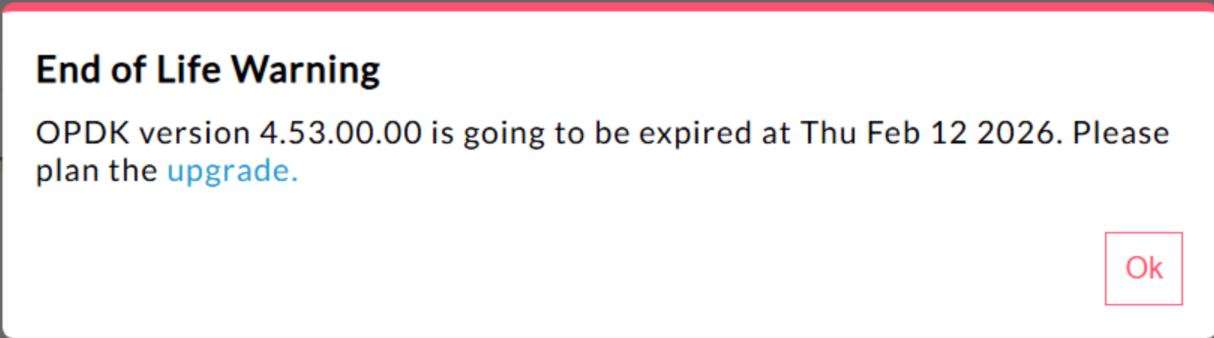
Edge for Private Cloud 4.53.00 440148595: End of Life Popup Warning Displayed Excessively

In Edge for Private Cloud 4.53.00 and later, the UI displays an "End of Life" (EOL) warning pop-up. This warning appears
repeatedly and cannot be prevented or reduced in frequency.

There is currently no method available for users to disable or reduce the frequency of this EOL warning.

Edge for Private Cloud 4.53.01
443272053: Datastore errors in edge components

In Edge for Private Cloud 4.53.00 or later, a specific type of interaction between Cassandra and application components (Management server, Message Processor or Router) may cause datastore errors. When such an error occurs, you'll observe logs of the following pattern in the specific application component's system logs:

com.datastax.driver.core.exceptions.ProtocolError: An unexpected protocol error occurred on host WW.XX.YY.ZZ:9042.

These errors occur when the application component is not configured to handle warnings generated by the Cassandra database. You can mitigate this issue by avoiding or suppressing warnings in your Cassandra nodes. In most cases, warnings are generated due to excessive tombstones. You can follow one of the following options or a combination of options listed:

  1. Reduce gc_grace_seconds: For the table displayed in the log message associated with the error, reduce gc_grace_seconds by running the following command like the following, using cqlsh:
    Below command sets gc_grace_seconds of kms.oauth_20_access_tokens to 1 day from default 10 days
    ALTER TABLE kms.oauth_20_access_tokens WITH gc_grace_seconds = '86400';
  2. Increase tombstone thresholds in Cassandra for generating warnings. For this, use the following instructions:
    1. On a Cassandra node, create or edit file $APIGEE_ROOT/customer/application/cassandra.properties.
    2. Increase Tombstone warn threshold to 100k from the default 10k or set larger values as appropriate by adding the following line:
      conf_cassandra_tombstone_warn_threshold=100000
    3. Ensure the file above is owned and readable by apigee user:
      chown apigee:apigee $APIGEE_ROOT/customer/application/cassandra.properties
    4. Restart Cassandra application on the node:
      apigee-service apigee-cassandra restart
    5. Repeat the above steps on each Cassandra node, one by one.
42733857: Latency in updating encrypted key value maps (KVMs)

When working with Encrypted Key Value Maps that contain a large number of entries, users may experience latencies when adding or updating entries, whether through management APIs or the PUT element within the KeyValueMapOperations policy . The extent of the performance impact is generally proportional to the total number of entries stored in the encrypted KVM.

To mitigate this issue, it is recommended that users avoid creating encrypted KVMs with an excessive number of entries. A viable solution is to divide a large KVM into multiple, smaller KVMs. Additionally, if the use case permits, migrating to a non-encrypted KVM can also serve as an effective mitigation strategy. Please note that Apigee is aware of this issue and plans to release a fix in a future patch.

Java Callouts

Customer Java callouts that attempt to load the Bouncy Castle cryptography provider using the name "BC" might fail because the default provider has been changed to Bouncy Castle FIPS to support FIPS. The new provider name to use is "BCFIPS".

Edge for Private Cloud 4.53.00
Java Callouts

Customer Java callouts that attempt to load the Bouncy Castle cryptography provider using the name "BC" might fail because the default provider has been changed to Bouncy Castle FIPS to support FIPS. The new provider name to use is "BCFIPS".

Edge for Private Cloud 4.52.01 Mint update

This issue affects only those who are using MINT or have MINT enabled in Edge for Private Cloud installations.

Component affected: edge-message-processor

Issue: If you have monetization enabled and are installing 4.52.01 as a fresh install or upgrading from previous Private Cloud versions, you will encounter an issue with message processors. There will be a gradual increase in open thread count leading to resource exhaustion. The following exception is seen in edge-message-processor system.log:

Error injecting constructor, java.lang.OutOfMemoryError: unable to create new native thread
Apigee HTTP/2 vulnerability

A Denial-of-Service (DoS) vulnerability was recently discovered in multiple implementations of the HTTP/2 protocol (CVE-2023-44487), including in Apigee Edge for Private Cloud. The vulnerability could lead to a DoS of Apigee API management functionality. For more details, see Apigee Security Bulletin GCP-2023-032.

The Edge for Private Cloud router and management server components are exposed to the internet and can potentially be vulnerable. Although HTTP/2 is enabled on the management port of other Edge-specific components of Edge for Private Cloud, none of those components are exposed to the internet. On non-Edge components, like Cassandra, Zookeeper and others, HTTP/2 is not enabled. We recommend that you take the following steps to address the Edge for Private Cloud vulnerability:

Follow these steps if you are using Edge Private Cloud versions 4.51.00.11 or newer:

  1. Update the management server:

    1. On each management server node, open /opt/apigee/customer/application/management-server.properties
    2. Add this line to the properties file:
      conf_webserver_http2.enabled=false
    3. Restart the management server component:
      apigee-service edge-management-server restart
  2. Update the message processor:

    1. On each message processor node, open /opt/apigee/customer/application/message-processor.properties
    2. Add this line to the properties file:
      conf_webserver_http2.enabled=false
    3. Restart the message processor component:
      apigee-service edge-message-processor restart
  3. Update the router:

    1. On each router node, open /opt/apigee/customer/application/router.properties
    2. Add this line to the properties file:
      conf_webserver_http2.enabled=false
    3. Restart the message processor component:
      apigee-service edge-router restart
  4. Update QPID:

    1. On each QPID node, open /opt/apigee/customer/application/qpid-server.properties
    2. Add this line to the properties file:
      conf_webserver_http2.enabled=false
    3. Restart the message processor component:
      apigee-service edge-qpid-server restart
  5. Update Postgres:

    1. On each Postgres node, open /opt/apigee/customer/application/postgres-server.properties
    2. Add this line to the properties file:
      conf_webserver_http2.enabled=false
    3. Restart the message processor component:
      apigee-service edge-postgres-server restart

Follow these steps if you are using Edge for Private Cloud versions older than 4.51.00.11:

  1. Update the management server:

    1. On each management server node, open /opt/apigee/customer/application/management-server.properties
    2. Add the following two lines to the properties file:
      conf_webserver_http2.enabled=false
      conf/webserver.properties+http2.enabled=false
    3. Restart the management server component:
      apigee-service edge-management-server restart
  2. Update the message processor:

    1. On each message processor node, open /opt/apigee/customer/application/message-processor.properties
    2. Add the following two lines to the properties file:
      conf_webserver_http2.enabled=false
      conf/webserver.properties+http2.enabled=false
    3. Restart the message processor component:
      apigee-service edge-message-processor restart
  3. Update the router:

    1. On each router node, open /opt/apigee/customer/application/router.properties
    2. Add the following two lines to the properties file:
      conf_webserver_http2.enabled=false
      conf/webserver.properties+http2.enabled=false
    3. Restart the message processor component:
      apigee-service edge-router restart
  4. Update QPID:

    1. On each QPID node, open /opt/apigee/customer/application/qpid-server.properties
    2. Add the following two lines to the properties file:
      conf_webserver_http2.enabled=false
      conf/webserver.properties+http2.enabled=false
    3. Restart the message processor component:
      apigee-service edge-qpid-server restart
  5. Update Postgres:

    1. On each Postgres node, open /opt/apigee/customer/application/postgres-server.properties
    2. Add the following two lines to the properties file:
      conf_webserver_http2.enabled=false
      conf/webserver.properties+http2.enabled=false
    3. Restart the message processor component:
      apigee-service edge-postgres-server restart
Postgresql upgrade when updating to version 4.52

Apigee-postgresql is having issues with upgrading from Edge for Private Cloud version 4.50 or 4.51 to version 4.52. The issues mainly occur when the number of tables is greater than 500.

You can check the total number of tables in Postgres by running the SQL query below:

select count(*) from information_schema.tables

Workaround: When Updating Apigee Edge 4.50.00 or 4.51.00 to 4.52.00, be sure to perform the preliminary step before upgrading Apigee-postgresql.

LDAP policy

149245401: LDAP connection pool settings for JNDI configured through the LDAP resource are not reflected, and JNDI defaults cause single-use connections each time. As a result, connections are being opened and closed each time for single use, creating a large number of connections per hour to the LDAP server.

Workaround:

In order to change the LDAP connection pool properties, do the following steps to set a global change across all LDAP policies.

  1. Create a configuration properties file if it does not already exist:
    /opt/apigee/customer/application/message-processor.properties
  2. Add the following to the file (replace values of Java Naming and Directory Interface (JNDI) properties based on your LDAP resource configuration requirement).
    bin_setenv_ext_jvm_opts="-Dcom.sun.jndi.ldap.connect.pool.maxsize=20
    -Dcom.sun.jndi.ldap.connect.pool.prefsize=2
    -Dcom.sun.jndi.ldap.connect.pool.initsize=2
    -Dcom.sun.jndi.ldap.connect.pool.timeout=120000
    -Dcom.sun.jndi.ldap.connect.pool.protocol=ssl"
  3. Make sure the file /opt/apigee/customer/application/message-processor.properties is owned by apigee:apigee.
  4. Restart each message processor.

To verify that your connection pool JNDI properties are taking effect, you can perform a tcpdump to observe the behavior of the LDAP connection pool over time.

High Request Processing Latency

139051927: High proxy processing latencies found in the Message Processor are affecting all API Proxies. Symptoms include 200-300ms delays in processing times over normal API response times and can occur randomly even with low TPS. This can occur when than more than 50 target servers in which a message processor makes connections.

Root cause: Message processors keep a cache that maps target server URL to HTTPClient object for outgoing connections to target servers. By default this setting is set to 50 which may be too low for most deployments. When a deployment has multiple org/env combinations in a setup, and have a large number of target servers that exceed 50 altogether, the target server URLs keep getting evicted from cache, causing latencies.

Validation: To determine if target server URL eviction is causing the latency problem, search the Message Processor system.logs for keyword "onEvict" or "Eviction". Their presence in the logs indicate that target server URLs are getting evicted from the HTTPClient cache because the cache size is too small.

Workaround: For Edge for Private Cloud versions 19.01 and 19.06, you can edit and configure the HTTPClient cache, /opt/apigee/customer/application/message-processor.properties:

conf/http.properties+HTTPClient.dynamic.cache.elements.size=500

Then restart the message processor. Make the same changes for all message processors.

The value 500 is an example. The optimal value for your setup should be greater than the number of target servers that the message processor would connect to. There are no side effects from setting this property higher, and the only affect would be an improved message processor proxy request processing times.

Note: Edge for Private Cloud version 50.00 has the default setting of 500.

Multiple entries for key value maps

157933959: Concurrent inserts and updates to the same key value map (KVM) scoped to the organization or environment level causes inconsistent data and lost updates.

Note: This limitation only applies to Edge for Private Cloud. Edge for Public Cloud and Hybrid do not have this limitation.

For a workaround in Edge for Private Cloud, create the KVM at the apiproxy scope.